|
Dear sir,
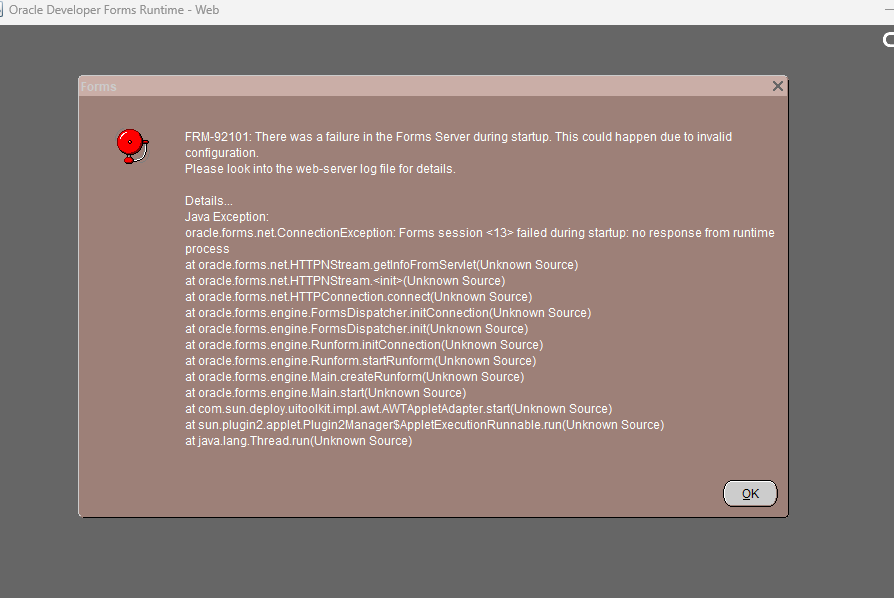
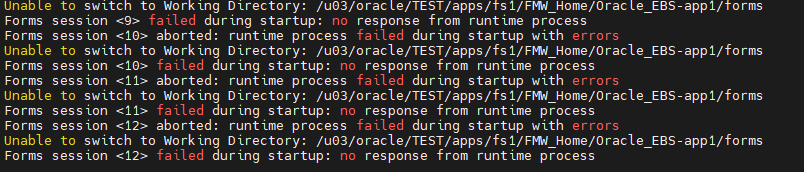
After I applied the CVE 2025 patches for EBS applications in the TEST environment (EBS 12.2.5, DB 12C), I encountered an error when trying to open a form: Forms session <12> aborted: runtime process failed during startup with errors Unable to switch to Working Directory: /u03/oracle/TEST/apps/fs1/FMW_Home/Oracle_EBS-app1/forms. This specific folder path does not exist on the PROD environment. I have already attempted the steps in Oracle Doc ID FRM-92101: Unable To Switch To Working Directory (Doc ID 1434888.1) but the issue persists. I would appreciate any assistance. Thanks you ![]()
|
|
Administrator
|
You said "This specific folder path does not exist on the PROD environment".
1) so don't you have <FMW_HOME>/Oracle_EBS-app1 directory and <FMW_HOME>/Oracle_EBS-app1/forms directory on PROD? 2)What about TEST, do you have "<FMW_HOME>/Oracle_EBS-app1/forms" ? 3)both on PROD and TEST do the following and send me the following command outputs; cd to <FMW_HOME>/Oracle_EBS-app1; run pwd command run ls -al command then cd to forms run pwd command run ls -al command 4)Did you successfully appiled the patches? Successfully executed the pre and post actions of the patches? Are you checked and sure for that? What document you follow / and actions you take? any missing thing there? |
|
Administrator
|
5)* Also check you have that forms directory on both of the fs(s) - fs1 and fs2. Maybe your active filesystem doesn't have that directory, but it is available in patch directory. Check that as well.. If so, we may take actions accordingly.
what is your run fs , and what is your patch fs ? state that as well and check accordingly. |
|
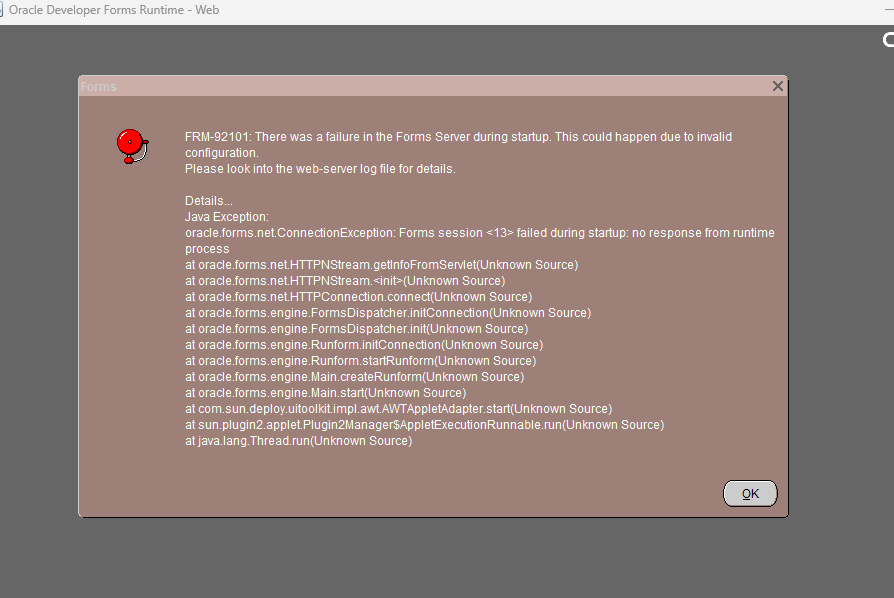
I performed a rollback and re-applied it, and while that error no longer appears, a different error has occurred. I have read and tried to apply "Getting FRM-92102 Errors when Accessing a Forms Module on a Cloned Environment (Doc ID 2237225.1)", ran adadmin, but the result was still unsuccessful.
![]() Process of applying patch for update AD TXK 16 and apply CVE patch User db: oratest /u01/TEST/oracle/db/ User app: appltest /u03/oracle/TEST/apps/ su appltest cd $PATCH_TOP/36119925/admin cp adgrants.sql ~ exit ###root cd /u01/TEST/oracle/db/12.1.0/appsutil/admin/ cp adgrants.sql adgrants.sql.bk cp /home/appltest/adgrants.sql /u01/TEST/oracle/db/12.1.0/appsutil/admin/ su oratest sqlplus / as sysdba col name for a50 col value for a20 SELECT a.ksppinm name, b.ksppstvl value FROM x$ksppi a, x$ksppcv b WHERE a.indx = b.indx AND a.ksppinm LIKE '_disable_actualization_for_grant%'; ALTER SYSTEM SET "_disable_actualization_for_grant"=TRUE SCOPE=both; exit; sqlplus /nolog @$ORACLE_HOME/appsutil/admin/adgrants.sql APPS su appltest cd $ADMIN_SCRIPTS_HOME sh adstpall.sh sqlplus system/manager ALTER USER EBS_SYSTEM ACCOUNT UNLOCK; ALTER USER EBS_SYSTEM IDENTIFIED BY manager ; perl $PATCH_TOP/36119925/ad/bin/adValidateEbssystemSchema.pl cd $PATCH_TOP ###Apply AD_16 adop phase=apply patches=36119925 apply_mode=downtime worker=50 (success) ### Apply TXK_16 adop phase=apply patches=36117775 apply_mode=downtime workers=50 (success) When I applied patch TXK_16, I get an error ![]() And I fixed ![]() ########Update Database Tier to Latest AutoConfig Code su appltest envrun perl $AD_TOP/bin/admkappsutil.pl exit su oratest cd $ORACLE_HOME mv appsutil appsutil_old ###ROOT cp /u03/oracle/TEST/apps/fs1/inst/apps/TEST_erpapp/admin/out/appsutil.zip /u01/TEST/oracle/db/12.1.0 chown oratest:test /u01/TEST/oracle/db/12.1.0/appsutil.zip ###oratest cd $ORACLE_HOME unzip -o appsutil.zip cp -r appsutil_old/jre appsutil/ cd appsutil/bin perl adbldxml.pl appsuser=apps cd $ORACLE_HOME/appsutil/bin sh adconfig.sh contextfile=/u01/TEST/oracle/db/12.1.0/appsutil/TEST_erpapp.xml sh /u01/TEST/oracle/db/12.1.0/appsutil/scripts/TEST_erpapp/adautocfg.sh su appltest cd $ADMIN_SCRIPTS_HOME sh adautocfg.sh apps ###### ####CPU JUL 2025 adop phase=apply patches=37923872 apply_mode=downtime workers=50 apps manager welcome01 ####CVE1 adop phase=apply patches=38501230 apply_mode=downtime workers=50 adop phase=apply patches=38501349 apply_mode=downtime workers=50 adop phase=apply patches=38501757 apply_mode=downtime workers=50 ###CVE2 adop phase=apply patches=37614922 apply_mode=downtime workers=50 adop phase=apply patches=38512809 apply_mode=downtime workers=50 adop phase=cleanup adop phase=fs_clone workers=50 Error when fs_clone ![]() Fixed: rm -rf /u03/oracle/TEST/apps/fs2/FMW_Home cd $ADMIN_SCRIPTS_HOME sh adstrtal.sh Before applying the patch, the forms were opening normally. I hope to receive your assistance. Thanks, sir |
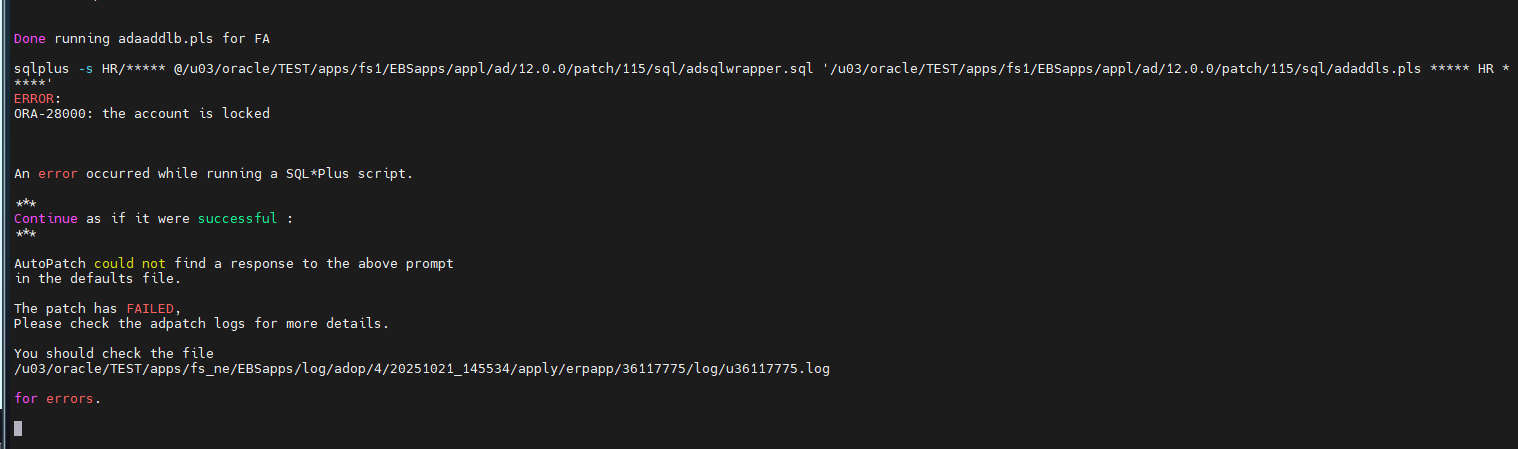
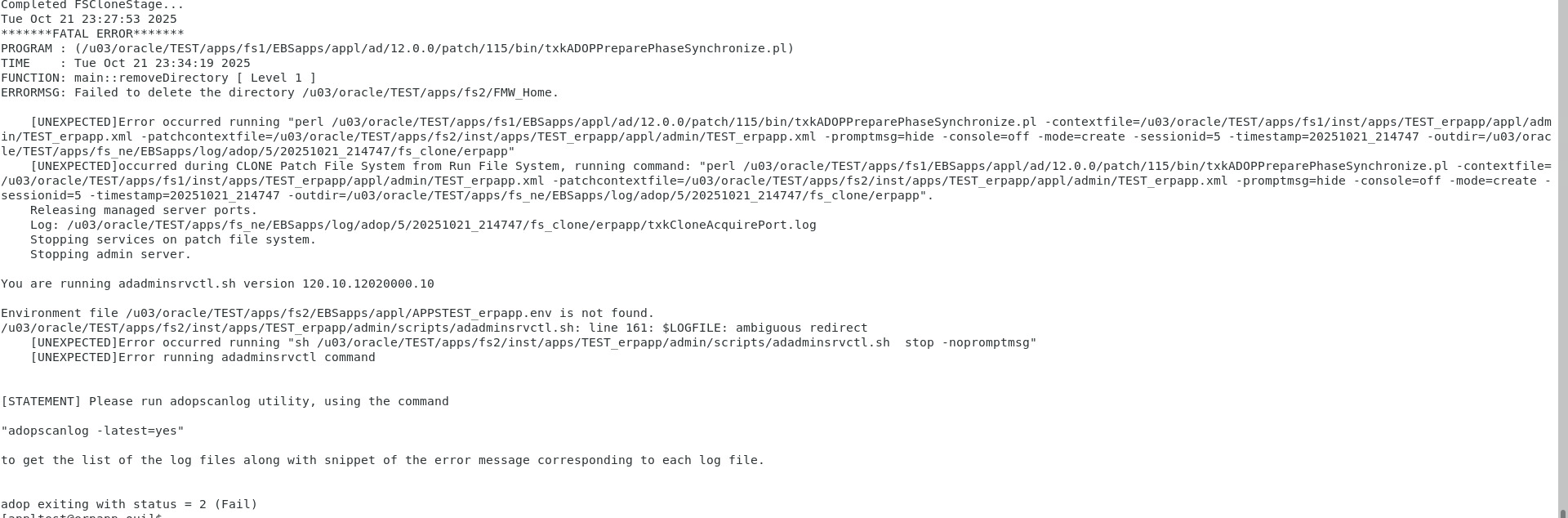
|
Administrator
|
This post was updated on .
SO, as far as I see, you reapply the patch(es), gott errors, and fixed them and made the patching process /or scripts made continue from where they left off. You say you applied the patches successfully then..
So your final error is FRM-92101, but this time it is for failure in forms server during startup. Check -> E-Business Suite 12.2 Forms Error 'FRM-92101' Connection from new browser window not supported if using custom jars not added in userjarfile (Doc ID 2142147.1) R12.2 FRM-92101 Error When Opening Multiple Forms in Separate IE11 Browser (Doc ID 2109411.1) FRM-92101 There Was A Failure In The Forms Server During Startup (Doc ID 2594880.1) FRM-92101:There Was A Failure In The Forms Server During Startup.This Could Happen Due To Invalid Configuration When Opening Forms (Doc ID 1931394.1 Check the following notes carefully, consider implementing the appropriate one(s) and update me with the outcome. |
|
After a while, I had followed with Oracle Support, problem is resloved.
This is a root cause from Oracle Support: "The Oracle E-Business Suite Release 12.2 April 2025 CPU introduced code that disabled URL rewriting which may result in FRM-92102 or FRM-92101 errors if you are using remote desktop protocol (RDP). Use the following steps to enable URL rewriting as a workaround until a more permanent solution is available." Oracle E-Business Suite Release 12.2 Critical Patch Update Availability Document (July 2025) ( Doc ID 3090429.1 ) Appendix A: Enabling URL Rewriting for Oracle E-Business Suite Release 12.2 After Applying the April 2025 CPU or Later And I followed Appendix A in Doc 3090429.1 to fix it and issue is resloved. I want to share it to you and thanks for your supports !!!!!! |
|
Administrator
|
Thank for the update. Good catch!
|
| Free forum by Nabble | Edit this page |